After the relaunch of PUBG Mobile as BGMI in India, many changes have been made to maintain safety measures in the game. To remind players about the game’s virtual world, a warning message plays every time to let players know they are entering a virtual world not it is not in real life.
In some cases, it is seen that players take it as real life. But if you feel like annoying with this warning message, then BGMI has provided the option to turn it off. Follow this guide, and you can easily do this.
“This is a Simulation game, set in a virtual world and does not represent real life. Please play in moderation. Take frequent breaks and play responsibly.”
How to Disable Spawn Island Broadcast in BGMI?
Step 1: Go to Settings in BGMI
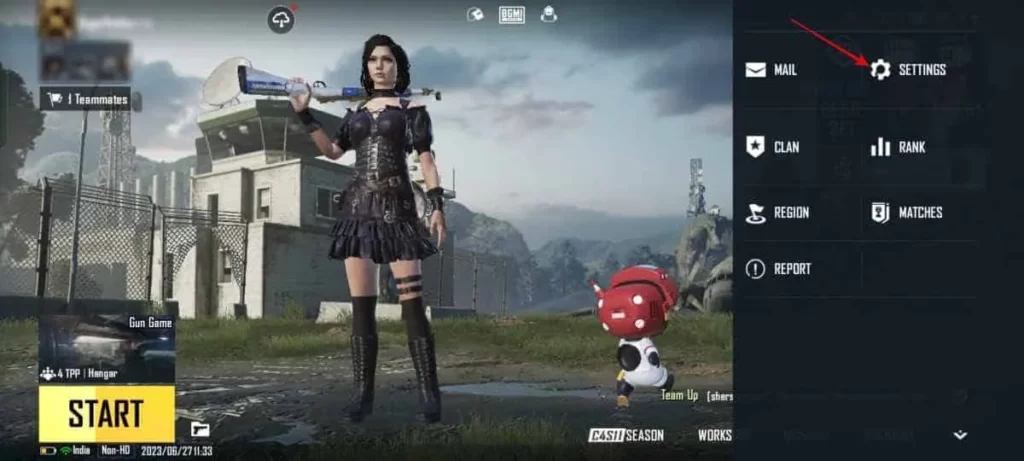
Step 2: Click on Privacy & Social > Disable “Spawn Island Broadcast“
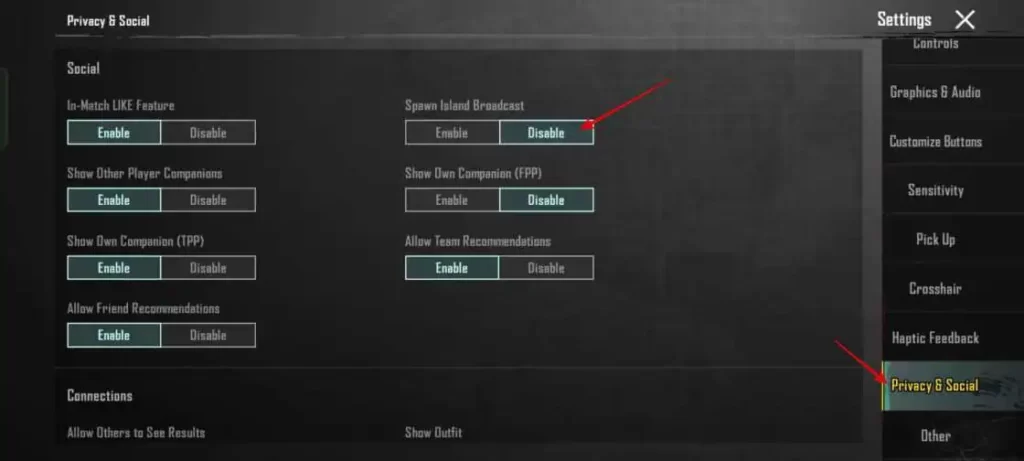
Start 3: Close and Start the game again
From now you will see only the pop-up message, and broadcast audio will not play. You can enable it again by following the above steps. In the previous version of BGMI, this option was available in the basic setting, but it is shifted.
Conclusion
It feels annoying when the same thing is repeated again and again. If you have any suggestions, don’t forget to leave them in the comments below.